
AppetizerAppetizer
Home
Recipes
Recipe collectionsPantry meal ideasWhat can I make?Fridge scanner appChicken recipesBeef recipesPasta recipesEasy dinner ideasHealthy mealsCooking tips
PricingContactPrivacyTerms
Get the app
Menu
HomeRecipe collectionsPantry meal ideasWhat can I make?Fridge scanner appChicken recipesBeef recipesPasta recipesEasy dinner ideasHealthy mealsCooking tipsContactPrivacyTerms
Fridge scanner app

Scan your fridge. Get recipes in seconds.

Standing in front of your fridge? Open Appetizer, scan what you have, and get recipe ideas tailored to your ingredients. The fridge scanner app built for busy cooks.

Get the appSee recipe ideas
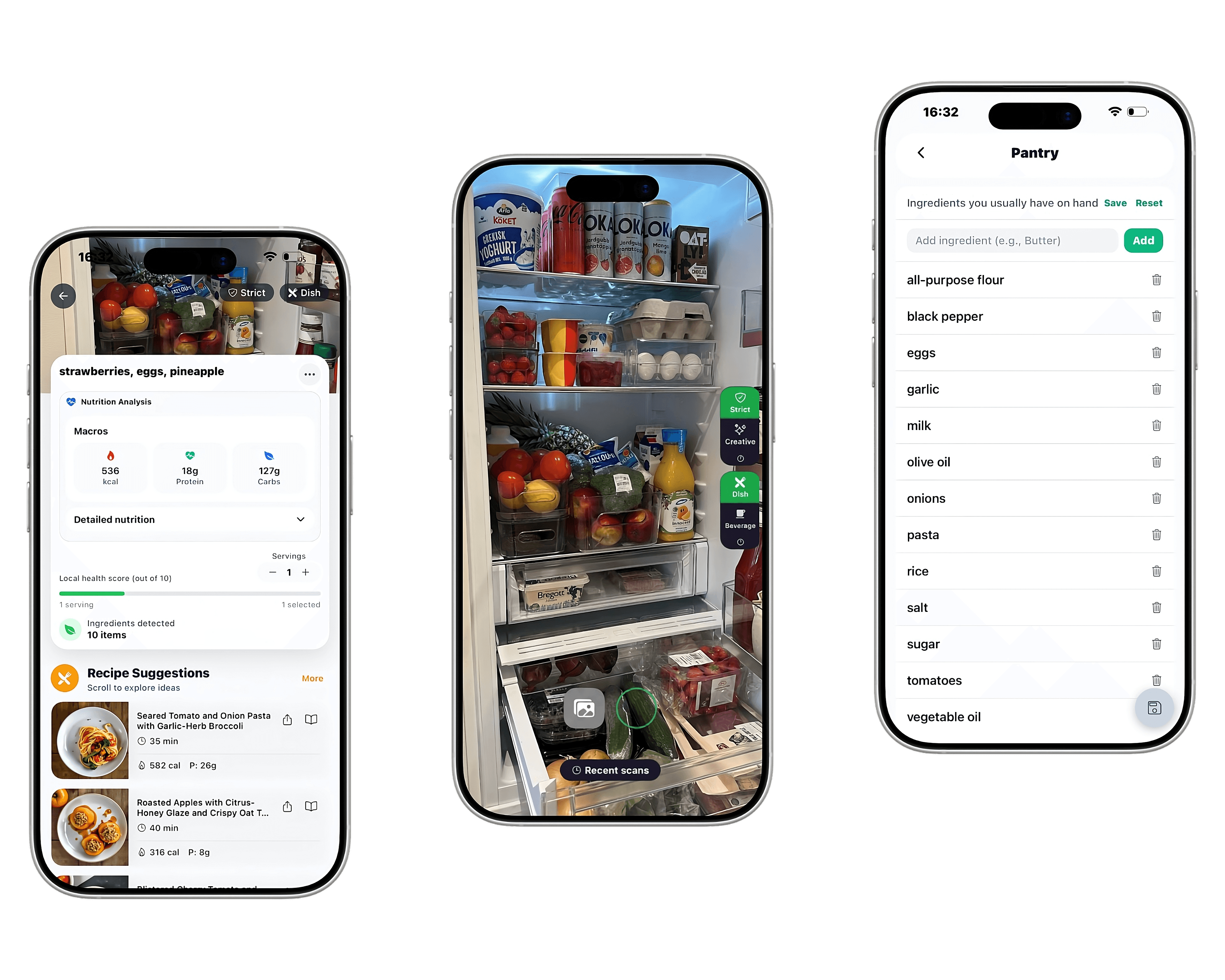
Appetizer fridge scanner in action

Never wonder what to make for dinner again

Get personalized dinner ideas, meal plans, and smart grocery lists — all in one app.

Download on App Store

Free to download • No credit card required

Fridge scanner app

Scan your fridge. Get recipes in seconds.

Standing in front of your fridge? Open Appetizer, scan what you have, and get recipe ideas tailored to your ingredients. The fridge scanner app built for busy cooks.

Get the appSee recipe ideas

Never wonder what to make for dinner again

Get personalized dinner ideas, meal plans, and smart grocery lists — all in one app.

Download on App Store

Free to download • No credit card required

Appetizer fridge scanner in action

Point and scan

Use your camera to scan ingredients. AI identifies what you have and suggests matching recipes.

Works with real food

Pantry items, fridge leftovers, even wilted produce. Get ideas for ingredients you need to use.

Mobile-first

Designed for your phone. Scan in the kitchen, cook with step-by-step mode hands-free.

What a fridge scanner app actually does

A fridge scanner app uses your phone camera and AI to recognize ingredients inside your fridge or pantry, then turns that list into recipes you can cook with what you already have. Instead of typing out every item, you point, scan, and get suggestions in seconds.

Appetizer is designed for the moment most people get stuck — you open the fridge, see a half pack of chicken, some spinach, an onion, and have no idea what to make. The scanner identifies those items, fills in pantry staples (rice, pasta, oil, spices), and proposes complete dinner ideas built from what you actually have.

Why scanning beats typing

Typing ingredients into a recipe site sounds simple until you do it three nights in a row. Most people give up after the second meal. A scanner lowers that friction to almost zero — open the camera, capture the shelf, and the app handles the rest.

Scanning also catches things you forget. A jar of pesto pushed to the back, a half lemon, the leftover rotisserie chicken — these are the ingredients that usually end up wasted. When the camera sees them, the app can suggest meals built around them so they get used first.

  • No more typing every ingredient by hand
  • Catches items you'd forget were there
  • Works for the fridge, pantry, freezer, and produce drawer
  • Suggests recipes that use what's expiring soon

How Appetizer's scanner works

Open Appetizer, tap the scan icon, and point your phone at your fridge or pantry. The app captures the ingredients it sees, lets you confirm or edit the list, and then generates recipe ideas tailored to your preferences — quick weeknight dinners, high-protein meals, low-carb options, or family-friendly dishes.

Every recipe shows time, calories, protein, and a full ingredient list. Tap into a recipe and you get step-by-step instructions you can follow hands-free in cooking mode, so your phone stays clean while you cook.

Who it's for

If you cook three or more dinners a week and spend even five minutes deciding what to make, a fridge scanner saves real time. It's especially useful for busy parents, anyone trying to eat at home more often to save money, and people who hate food waste.

It also works well for meal planners. Scan once on grocery day, generate a week of meals from your haul, build the shopping list for what's missing, and stop wasting groceries.

Try Appetizer free

Add ingredients you have on hand and Appetizer will suggest recipes you can cook tonight.

Get the app

Frequently asked questions

Is the fridge scanner free?+

Appetizer offers a free tier that includes the scanner and basic recipe generation. Premium unlocks unlimited generations, meal plans, advanced scan, and smart grocery lists.

Does it work without good lighting?+

It works best with a clear, well-lit shelf. If the scan misses an item, you can add it manually in one tap — the rest of the list still gets used.

Will it recognize packaged products?+

Yes. The scanner handles packaged staples (pasta, rice, canned goods) as well as fresh produce, dairy, and meat.

Can I use it to plan a whole week?+

Yes. Scan once, generate multiple meals, drop them into a weekly plan, and Appetizer builds a single grocery list for everything you're missing.

What phones does it support?+

Appetizer is available on iOS via the App Store. Android support is coming soon.

EXPLORE

What can I makeStop food wastePantry meal ideasRecipe collections

Get the Appetizer app

Never wonder what to make for dinner

App Store

Appetizer

Calm, premium meal planning and AI recipe generation — designed to reduce friction from everyday cooking.

PRODUCT

What to make for dinner30-minute dinnersOne-pot mealsMeal prep recipesChicken recipesGround beef recipesPasta recipesVegetarian dinner ideasSalmon recipesPork recipesRecipes from ingredientsCooking tipsPantry meal ideasFridge scanner appPricingContact

LEGAL

PrivacyTerms

SUPPORT

appetizer98@gmail.com

© 2026 Appetizer. All rights reserved.

Built with care for busy cooks.